





Choose Accesssories

Uploaded May 7, 2026, 5:53 a.m.
Updated June 4, 2026, 7:57 p.m.
Choose Accesssories
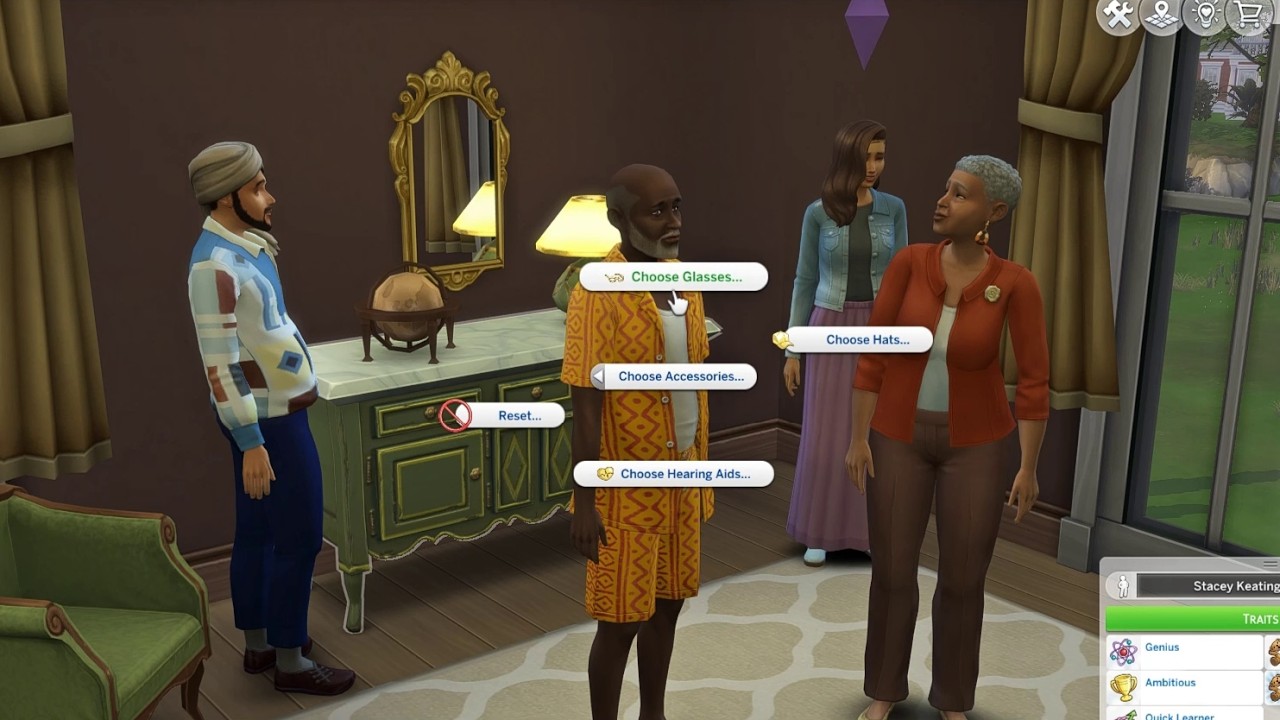
This mod lets you pick accessories in live mode that you can then put on or take off. Those accessories hide (but don't remove) any accessories in the same slot that were put on the sim in CAS. So you can, for example, choose your sim's glasses and hearing aids and they'll wear them on all outfits (including work) until you take them off (or until they take a bath or shower, go to sleep, or go swimming in most cases). Or you can pick their bonnet that you want them to wear to bed. Or you can pick their hijab and put it on and take it off when appropriate.
(There's a TLDR at the bottom, but if you skip the description and then get confused, I'm going to tell you to read the description or watch the video.)
With a teen or older sim, click on a mirror or dresser and find the menu called Choose Accessories. Then pick the type of accessory you want to put on your sim. Pick an option and a menu will appear that gives shows you what's available.
Currently included are glasses (prescription type), hearing aids, and various types of head coverings.
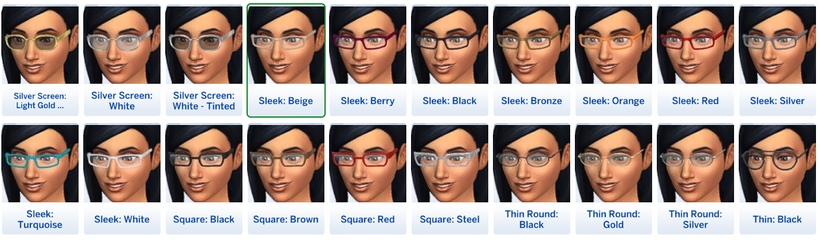
After you pick your accessory, it will appear on your sim and they'll get a trait telling you which one they've chosen. If you decide that's not the right one for them, you can go back in and pick a different one. For ten sim minutes, the ones you've already tried will have a green outline so that you don't lose track, because the list can be long.
After you've made your decision, there will be a new interaction available to your sim in the outfit menu. While they have their chosen accessory on, they'll have the option to take it off. While they have it off, they'll have the option to put it on. That's unless you choose the Hide CAS option (not available for hats), which will only hide whatever their CAS accessory. Then you'll have the option to hide or unhide the CAS accessory. When you take off the accessory (or unhide), whatever the sim has set in CAS will reappear.
To reset your chosen accessories, choose one of the reset options in the menu on a mirror or dresser.
For the most part, all accessories will stay on until a sim showers, takes a bath, swims, or goes to sleep. Hide CAS options will stay on until you remove them (or pick a conflicting option). Options that may be for sleeping will not be removed automatically. Prescription-type glasses and hearing aids should go back on when your sim stops bathing/sleeping/swimming.
You can pick one option from each menu. If you pick a different option, the one you had previously will be removed. So you can pick glasses and hearing aids and one from each group of head coverings (auto remove and no auto remove), but if you pick a different hearing aid, the first one will be removed. You can keep track of what your sim has selected in their traits.
The chosen accessories will not be visible in CAS. You can only give them to your currently active sim (unless you cheat, but then the same restrictions will apply -- on until they bathe, swim, or sleep while on or near an active lot -- you won't have the interactions to put them on or take them off available, and it's not something I'm supporting, so if it goes weird, you'll need to play them and reset their accessories).
In most cases, I used something close to the internal name. Sometimes there is no real internal name (some things are just the pack code) or there are multiple different things with the same name, so I added one.. Sometimes the name was too long and I had to change or shorten it. Most of the time I used something close to the internal swatch name. Sometimes the internal swatch is just wrong -- sometimes I could change it and sometimes I couldn't.
Categories included, and small details:
Glasses:
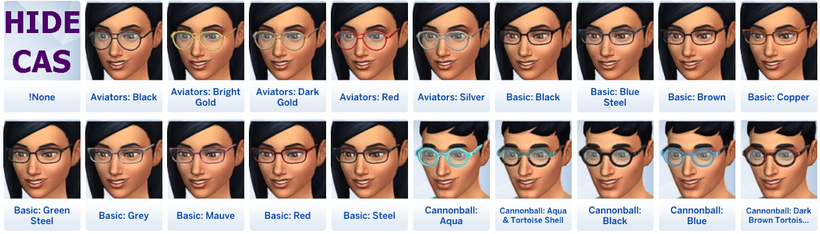
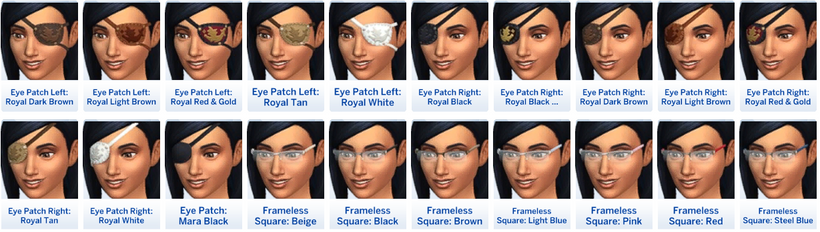
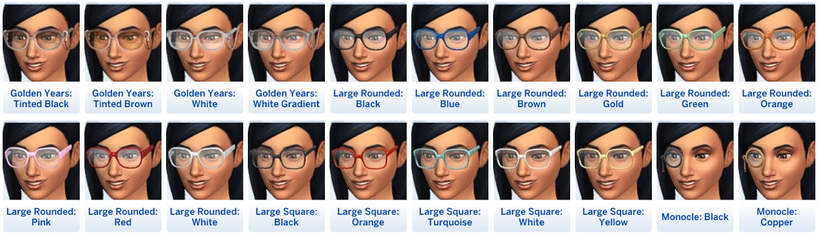
- Glasses -- things that I thought were likely to be prescription lenses. In most cases, that's all of a certain kind, but in a couple of cases, it's only some swatches (Casanova Cave's last two swatches, half of the Cottage Living glasses). Will be removed when sleeping, bathing, or swimming, and will be put on when stopping sleeping, bathing, or swimming.
- For the Golden Years glasses, the necklace glasses are included here and you can switch between glasses worn as glasses and glasses worn as a necklace. Blue Fade doesn't have an equivalent necklace version for some reason. If you have that kit and choose not to download my extra file for that, you won't have a necklace version for those. The option will appear, but the glasses will disappear if you try to put them around your sim's neck. The necklace version of Fade Blue will appear in CAS as an add-on swatch after the existing swatches.
- Eyepatches from the Lost Legacies Event (related to the royalty pack) should be greyed out if you don't have them unlocked. If you have an unlocker for event items, you can try it, but I can't promise it'll work.
- 205 individual swatches, if you have all packs.
Piercings:
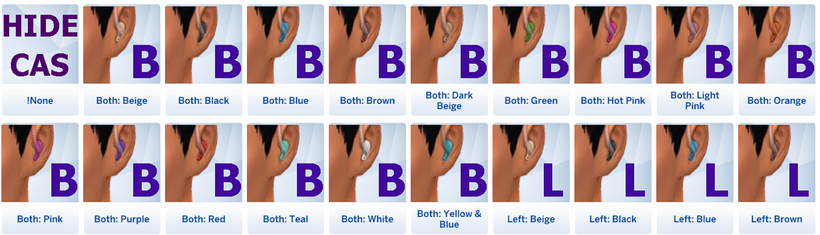
- Hearing Aids -- come in left, right, and both ear versions, as indicated in the name and by a letter on the thumbnail. Hide CAS will also hide earrings, because on a technical level, they're the same thing. Will be removed when sleeping, bathing, or swimming, and will be put on when stopping sleeping, bathing, or swimming.
- 46 swatches (15 each).
Headwear
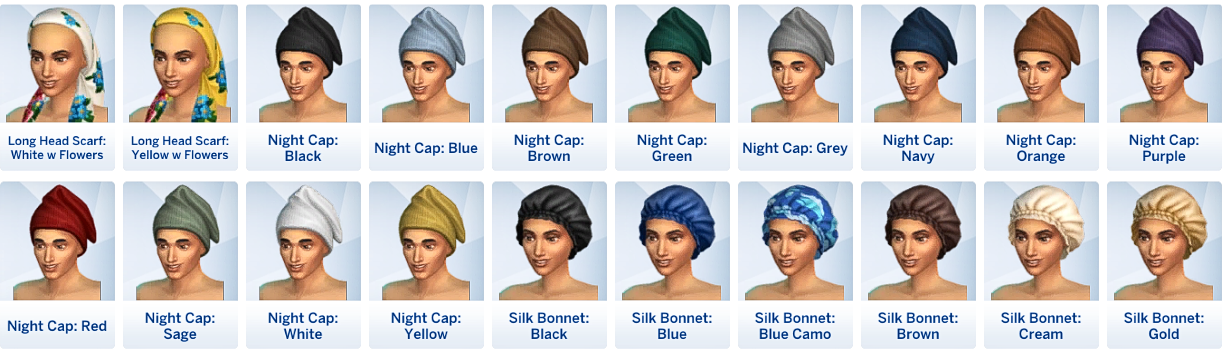
- Head Coverings (Auto Remove) -- things that you'd put on for modesty, cultural, or religious reasons, or to just cover your hair, that would NOT be worn when sleeping, swimming, or bathing. Will be removed when sleeping, bathing, or swimming, and you'll have to put them back on. Does not include things that are meant solely for formal wear (according to google). Use CAS for that. Does include some things that fit more in a historical or fantasy setting. Not divided by gender -- with one exception, everything's available for everyone, and you know your sims better than I do.
- Included are various types of head scarves, hijabs, prayer caps, turbans, and other cultural headwear, whether current, historical, or fantasy, that are included in the game.
- The Mirialan head covering is the only one to be locked to the feminine frame and have no masculine frame equivalent. It's marked with [F] in the picker, and will be greyed out when playing a sim with a masculine frame.
- 168 individual swatches, if you have all packs.
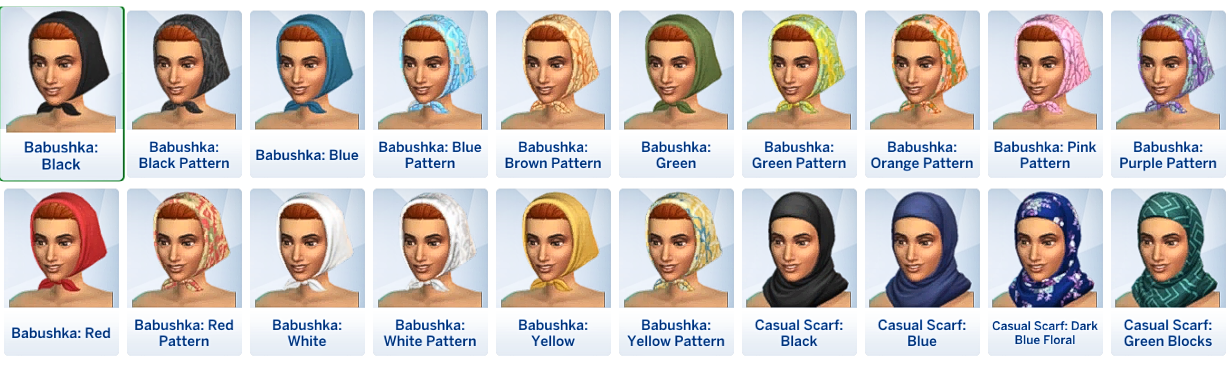
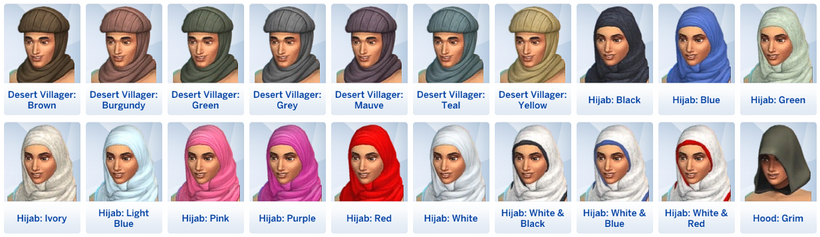
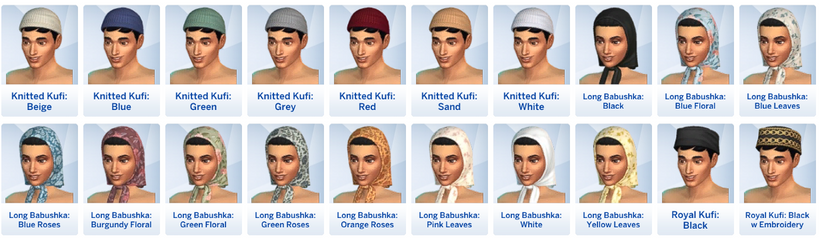
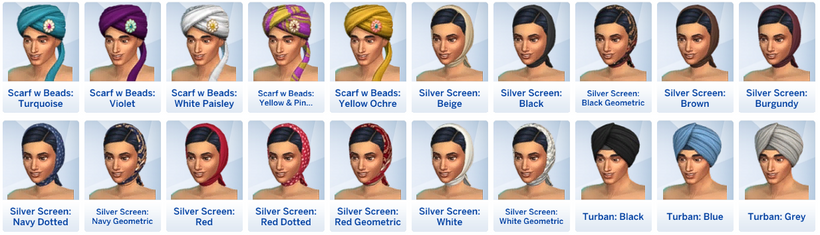
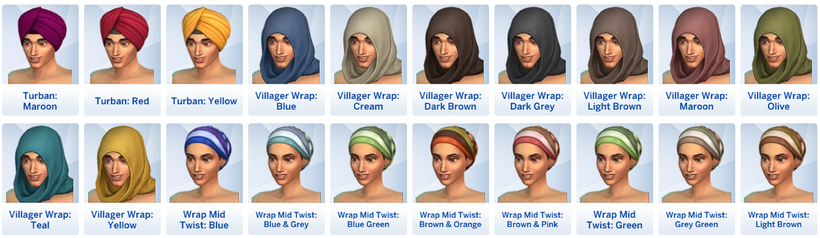
- Head Coverings (No Auto Remove) -- things that you might put on for modesty, cultural, or religious reasons or that you might wear while sleeping, swimming, or bathing. You will have to manually put these on and remove them. Does not include things that appear to me to be solely for swimming. Use CAS for that. I'm aware that some may be worn in different contexts as day wear and in other contexts as sleep wear, or even shower caps or swim caps, but things are in one menu, so if they can reasonably be called sleepwear, they're here. Not divided by gender -- everything's available for everyone, and you know your sims better than I do.
- Included are slik bonnets, various head scarves, durags, and night caps.
- 149 individual swatches, if you have all packs.
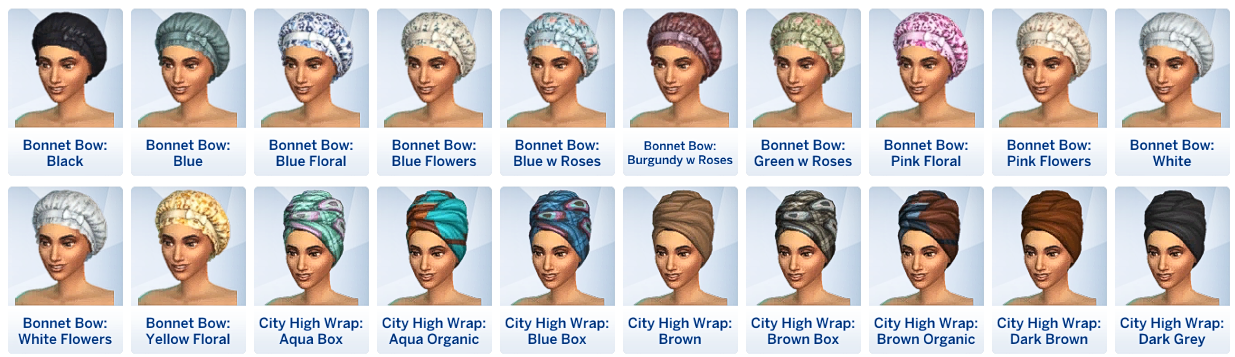
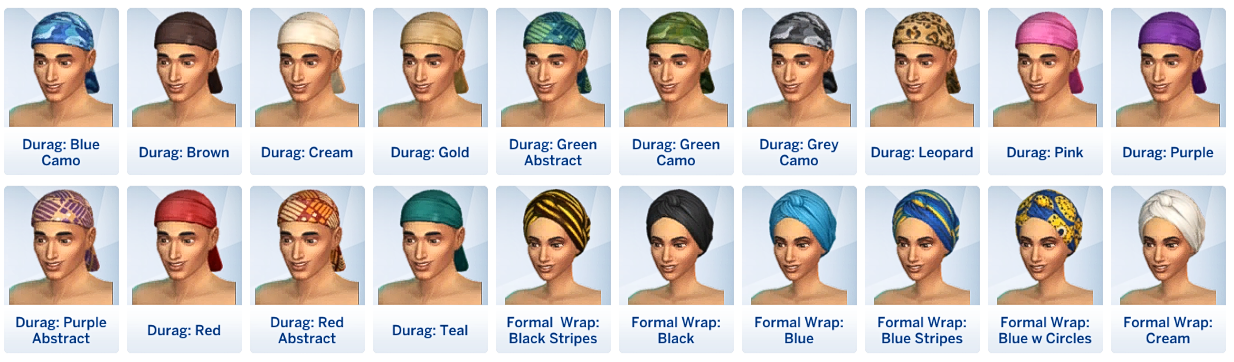
Details
This is NOT a small mod. Each and every swatch needs to be added individually, with at least 11 files created per swatch, sometimes more, and four more edited. And sometimes one small change means going back and editing one (or more) per swatch again.
That means there are a LOT of parts to it, and while I think I have everything working right, please let me know if I missed something. Also let me know if it's too wide for your screen (ideally with screenshots on discord). There can be fewer columns, but there'll be more rows, so I went with something that fits on my screen, but I can't say if it will adjust well to other screens.
This is not everything that I want to add, but I've been working on it for over two months, and I need to look at something else for a while. If you're a patron, there's a poll available to help me decide what to add next when I come back to it.
You can only pick things that are specifically added, which means that it doesn't work for cc unless it's specifically added.
Choosing an accessory WILL override all outfits as long as that accessory is on, and it will show up in the sim's portrait and in the change outfit menu.
Other Mods and CC:
Chosen accessories MAY override things meant to be added by other mods or in the game itself. If that happens, you can use the interaction on the sim (in the Outfits menu) to remove them temporarily. Or the other mod may override mine. Depends on what they set their priority to and which comes first.
As of June 1, 2026, integrated with ADeepIndigo's EyeCare (When glasses are on, they will count as prescription eyewear and when you take them off, they will count as not having glasses on.) and Healthcare Redux (Hearing aids will work for hearing aids with that mod).
Accessories will NOT work with the colour slider mod, because it adds new swatches and I can't add those to the mod, because they only exist in your game.
If you use these mods, they'll work for things chosen in CAS but not things chosen using this mod (so things chosen in CAS will be removed and put back on as these mods say, but my mod controls things chosen using my mod):
- Sleep Without Shoes or Glasses by HelenTheHunter
- Remove Hats & More Indoors by MizoreYukii
- No Accessories and Makeup Sleeping by Szemoka
You can only pick things that are specifically added, which means that it doesn't work for cc unless it's specifically added.
I'm planning to add a template for if people want to add things on their own to existing menus, but I have to wait and see if Core Library will get an update to add the ability. That will come later, if it's possible. When that happens, it won't be simple. It'll be more for people who know their way around Sims 4 Studio. I made each one with 11 files plus edits to more. Adding cc will require at least that, maybe more.
I'm also planning to let people commission additions, if you don't want to do it yourself. That also needs to wait for an injector to be added to Core Library or for me to find out that that's not going to happen. So that's also for the future, although it'll probably happen either way. There will be restrictions on what I'll do, but adding new menus is a possibility, so this won't be completely restricted to existing menus.
Installation:
- Download the zip.
- Unzip it. This may happen automatically if you're on a mac.
- Put the amethyst-Choose Accessories folder in your Mods folder. You can rename it, but please keep the files together
- Make sure you have Lot 51's Core Library.
- Inside the folder, there's amethyst-Choose Accessories-Main.package. This file is required.
- There are also three folders. Install whichever parts you want.
- Glasses has two files.
- amethyst-Choose Accessories-Glassses.package is required if you want to choose glasses.
- amethyst-Golden Years-Blue Fade Necklace Glasses.package requires the Golden Years kit adds a missing swatch to the glasses necklace (available in CAS and in the mod). If you have that pack and delete this, if you choose the Blue Fade swatch of those glasses, you'll have an interaction that's supposed to put the glasses around your sim's neck that does nothing. (You can keep this even if you delete everything else. It's just cc.)
- Hats has two files. What they do is described above.
- amethyst-Choose Accessories-Headcoverings-AR.package is the Auto Remove file.
- amethyst-Choose Accessories-Headcoverings-NAR.package is the No Auto Remove file.
- Piercings has amethyst-Choose Accessories-Hearing Aids.package which is, shockingly, hearing aids.
TLDR:
- Pick things on a mirror or dresser.
- Put them on or off using an interaction on your sim, in the Outfits menu.
- Most will come off when sleeping, bathing or showering. You have to put hats back on yourself. Glasses and hearing aids will go on after sleeping, bathing, or showering.
Updates:
- May 8, 2026: Description update only. No need to redownload. Added a section specifically about other mods and cc, and added a TLDR at the bottom.
- May 9. 2026:
- Updated so that glasses and hearing aids will go back on after a sim wakes up, gets out of the shower or bath, or stops swimming. The change will happen fast, and it will happen whether or not your sim was actively wearing them before starting sleeping/bathing/swimming. That's the only way it can work with also allowing your sim to take them off when they want to.
- This change it NOT reflected in the video, because I'd have to reupload the video and I don't have a couple of hours to keep my computer from falling asleep while not using it much at the moment.
- Organized the description a bit more. I know it's still too long, but I don't think there's anything I can cut.
- June 1, 2026: Added integration with ADeepIndigo's EyeCare (glasses that are on will count as prescription eyewear) and Healthcare Redux (hearing aids that are on will count as hearing aids). Thanks, ADeepIndigo!
Other Uploads By Amethyst Lilac:

The Culinary Librarian Aspiration by Keksdrache Updated
 by
Amethyst Lilac
by
Amethyst Lilac
There is a vast array of recipes to prepare for hungry guests and famished family members. By mastering the cooking skills and perusing the food stalls for recipes, your Sim …
Only Detectives Get Cases
by
Amethyst Lilac
Adds a test to the GTW bulletin board so that police interactions only show up for sims in the detective career.

Continuing Education
by
Amethyst Lilac
A set of aspirations that will see your sims learning and using skills that lead them to earning a Bachelor's Degree, Doctorate (no doctorates are included in the download at …
More Sim Names
by
Amethyst Lilac
Adds more names for sims, pets, and various other groups to get randomly. It works for CAS and sims randomly generated in live mode.

Famous Pastry Chef Aspiration
by
Amethyst Lilac
This sim wants to master the art of baking and become a famous pastry chef! Famous Pastry Chef Aspiration by xbrettface updated
Peaceful Mourning V2, 12x
Project: Peaceful Mourning
by
Amethyst Lilac
Adds an interaction to headstones, urns, photos, paintings, and mirrors that lets your sims actually feel better instead of worse, and reduces the length of their grieving if you have …
Star Jewelry in Blutonium
Project: Crystal Metal Recolour Series
by
Amethyst Lilac
Star Jewelry in Blutonium

Loading Screens To Match My Main Menu Overrides
Project: Theme
by
Amethyst Lilac
Loading Screens To Match My Main Menu Overrides