Using Expanded Active Households/Home mod by Savanita! 🏠
Project: Using Expanded Active Households/Home mod by Savanita!

by desiree-uk
Uploaded Dec. 6, 2025, 2:23 p.m.
Updated Dec. 6, 2025, 2:34 p.m.
Using Expanded Active Households/Home mod by Savanita! 🏠
UPDATED: by TheSweetSimmer (Savanita): Expanded Active Households/Homes V3! - Updated 5th Dec 2025
This is a long time coming as I wanted to make this guide as soon as Savanita's mod came out, but then I got waylaid learning to make mods myself 🥳 and then RL happened, but now I've finally got it together! 😛
I really love this mod by Savanita! 💖 Testing it out was so fun and I enjoyed throwing out ideas to her to see which one would work lol
She said she wanted make a mod to allow sims in the active household to be able to live on different lots without them returning to the main home lot and to be able to change certain things such as allowing ownership of beds on other residential lots. It really piqued my interest. At first I thought we could already do that, but then I realised we couldn't without a lot of other mods and different settings of them, and restriction of sims autonomy so they wouldn't disappear as a homeless NPC! lol
While testing the mod, I asked her what was the original plan for the mod - because it was way more flexible than what I initially thought. Savanita said that she had been playing one of her main households quite a lot, and they have a lot of friends and family scattered around the town which she also liked to play sometimes too. She always felt like it was hard to control all of the sims if they went on an outing together, and if one of them has a baby or toddler, to get other family members as free babysitters rather than a random stranger take care of babies/toddlers.
As a player who plays rotationally I got it! I really loved the idea of using extended familes and friends more in my rotations!
This mod is very simple to use and once you start playing with it, you'll see how flexible it is. You can almost achieve any kind of interactive gameplay you want with a little creativity. I'll be showing you here how I'll use it in my game.
- Houses
- Apartments
- Community Lots
- Pets
- Complimentary mods
I'll give some ideas on how I'll use it on houses, community lots, with pets, and other mods I'll use along with it to achieve different scenarios.
I'll be using the regular expressions of 'expand' 'expanded sim(s)' 'expanded household(s)' 'expanded lot/house' etc to describe the sims or house/lot that has a marker on or is assigned to - I was pretty much using them from the beginning, they sound so organic lol
This mod does require Lazy Duchess' MonoPatcher !
I know some people don't like using it, but believe me, it's worth it to use a little mod like this that can achieve so much ! 💚
Houses
If your family has ownable lots, this mod is perfect for them as you can spread out your family to live on them while still being linked together as the main household.
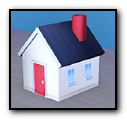
Playing the active family you want to expand, add the little house marker - found in Decor>Sculptures for §0 - on the house you want a sim(s) to live on.
Assign the sims you want to live in the house.
You can also assign pets (more on pets later! )
Give the marker a name!
When you click 'Go Home' on their portraits, the assigned sims go to their new expanded house!
Using a well known family (and one of my favourites to test with), the Sekemoto family is just right for this mod!
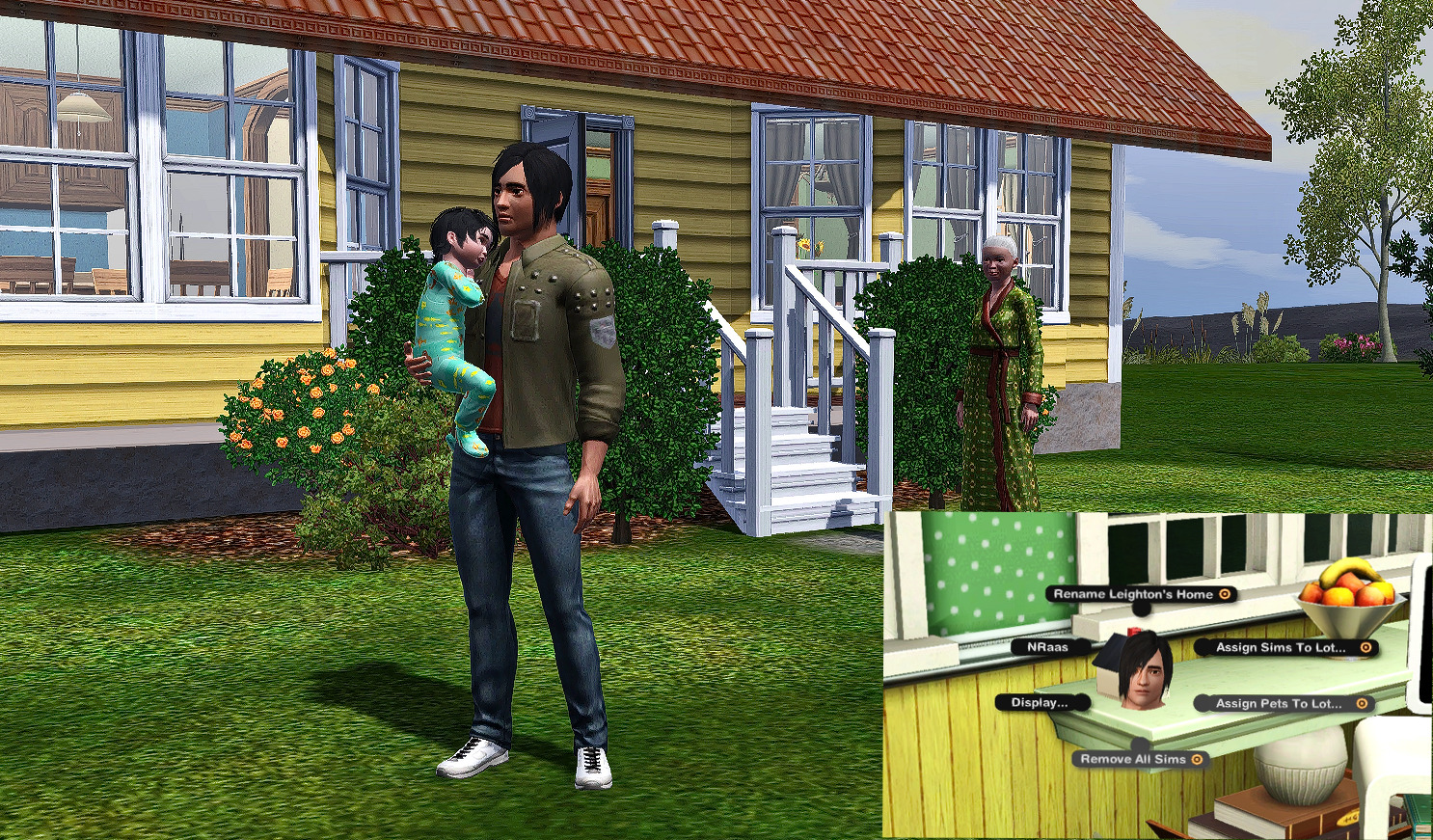
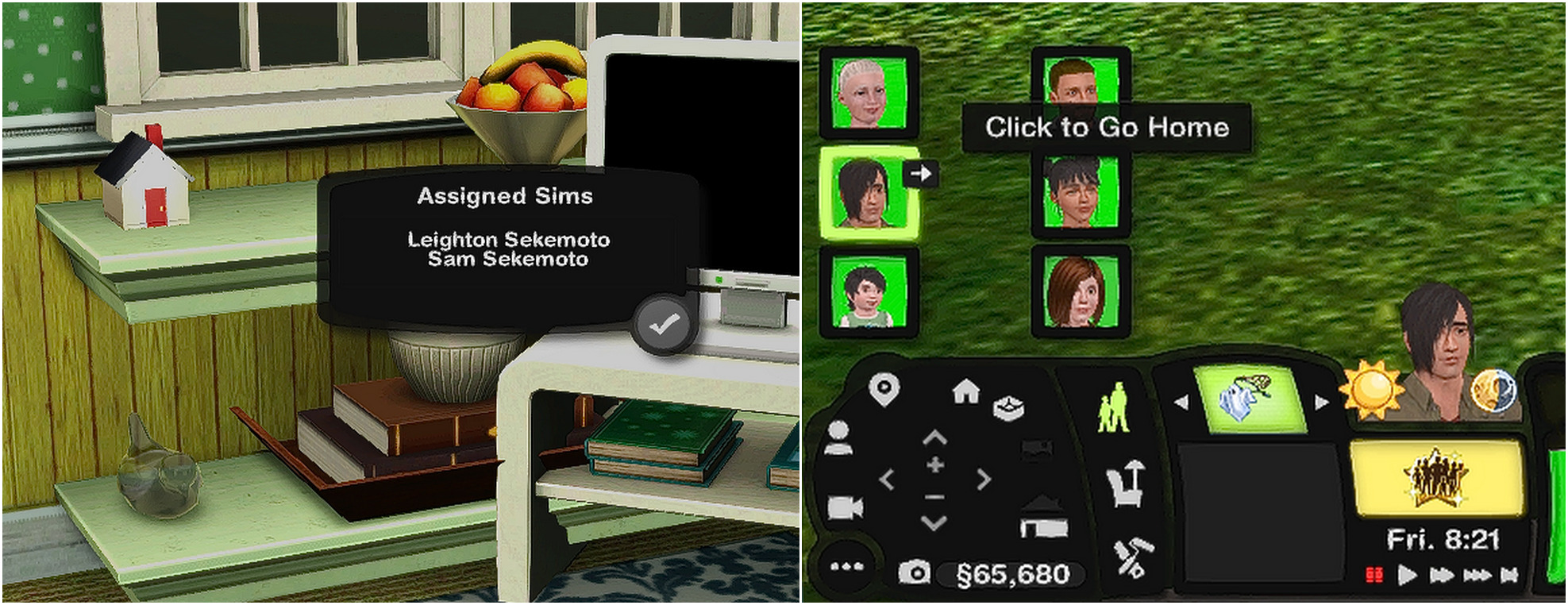
Yumi is finally fed up of Leighton being all up under her feet and wants him to finally spread his wings, settle down and maybe find a lovely partner who can love and take care of him and his cute son, Sam. But Leighton's sports career isn't really hitting the pinacle of his talent and paying much money so he can't really afford to move out. Yumi buys a little cottage next door with her retirement and pension money. Leighton and Sam can live there, have their own space but still be near by and most importantly - household-bound (another good expression!) to the main house - so I can easily switch between the members and both houses are open for all members to come and go. Leighton can drop Sam over to mum and she can visit them.
Of course that also means they share household funds and fridge inventories. For expanded households like this, it works perfectly because Leighton can save money until he can afford to buy or rent his own home and Yumi can cook and he and Sam can still enjoy her food from the fridge in their own place! lol
Family Inventory with the Expanded Household mod:
Ownable lots can share the family inventory with the main lot. So if a sim on the expandable lot can't afford new furniture, they can bring over a sofa or bed, whatever they want! To do this, you have to switch to a sim on the main lot and shift+click on the floor of the expanded lot to access the family lot in Buy Mode. So in my above example, if Leighton wants his desk and laptop from his old room, switch to Yumi, pack up the items from the house, then move the camera to the apartment, shift+click into Buy Mode and you'll see his desk and laptop in there!
(My open family inventory mod doesn't work with Savanita's Expanded Household mod, but they both work well independent of eachother 🙂)
Expanded Household Notes
The home marker can be placed on empty houses that are not purchased by the main household or any sim.
You can add multiple markers on one expanded lot and give them different names so you can read them from the tooltip to know who or what they are for.
You can add as many sims to one marker or across many markers to spread them out.
The sims can be either from the same household or from different households - you have to switch active households to add sims from them.
Other Ownable House ideas
- Have extended family live on ownable houses
- Granny annexe - a small flat on lot next door - can be owned by household but doesnt have to be.
- Or actual Granny! - elderly parents or widowed grandparent to live with family but want their independence.
- Have teen or YA offspring live away from home. Far enough to be out of their parents hair but near enough to still be controlled by them!
- Young married couple starting out but cant afford to move away completely.
- Young couple with baby wanting space but still want to live near grandparents and extended family.
- Lodger - assign a resident sim, like a friend, extended family member, that you don't mind using your funds or eating your food from the fridge! Use PJSims bank objects from her club mod to have them pay the main household.
- Resident sim as a service sim - to work for the main household as a live-in cleaner, butler, maid, gardener, babysitter - added to the main family but has own space - can use other mods such as the bank mod to pay them, the allotment mod for a gardener, give neat trait for cleaners/maids etc, (make sure they have access to the main lot), live-in babysitter, (either invite them over to babysit or drop your baby at their flat).
- Stay over at family or friends houses/sleepovers - If you have sims you like to visit often but not necessarily want to move in with them, add a maker on their houses and assign your sim to it. I've only tested this with family so I didn't get the 'inapropriate visitor' message, but I will try doing this with friends. If I do see the message, I'll just give them the 'Inappropriate But In A Good Way' reward. To have them stay over at your active sims house, switch to the visitors you want, assign them to the marker on your active lot. They can stay over for as long as you want them assigned to the marker. When you're tired of them hanging around, take their names off, and they go back to their homes!
Apartments
The above notes are very useful for blocks of flats/apartments that you want to fill up with your own resident sims and not NPCs. The lot doesn't have to be owned by a particular sim (unless you want it to, in that case you'll have to set up your own ways to have the tenants pay rent to the owner)
Important for Expanded Apartments to work:
- Set lock door options - use EA Door Lock or NRaas GoHere
- Set bed ownership
- Add cot/crib for babies and toddlers
- Add fridge
- Add cooker
I made this block of flats that has 4 small flats in it. Again I'm using Leighton as my first sim to test it out lol
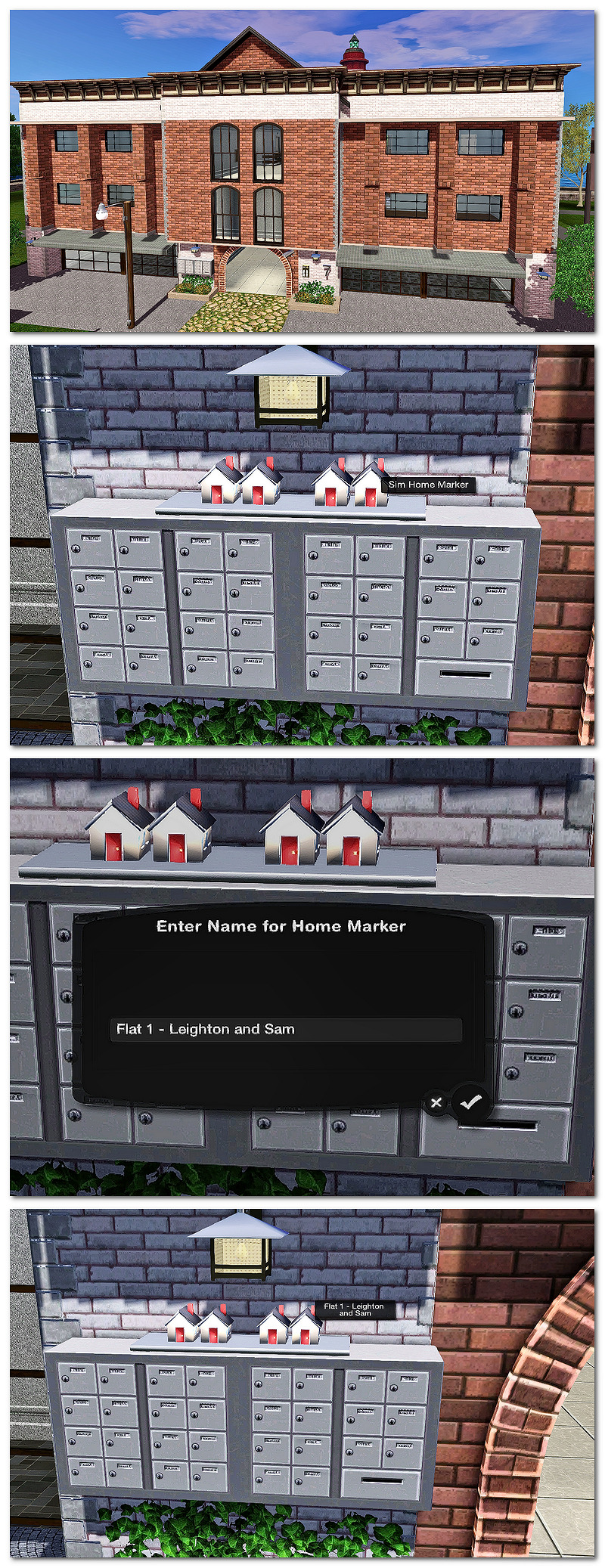
As the lot isn't owned by anyone its no point putting the marker(s) inside the lot as you won't be able to access the inside of it until a sim is assigned to it, so I place them outside - I'll move them to the sim's inventory or at the back of the house in my main game or so they won't stand out so much - I'm just putting them at the front for this test game.
I added Leighton and Sam to a marker, named it after him and what flat he's in.
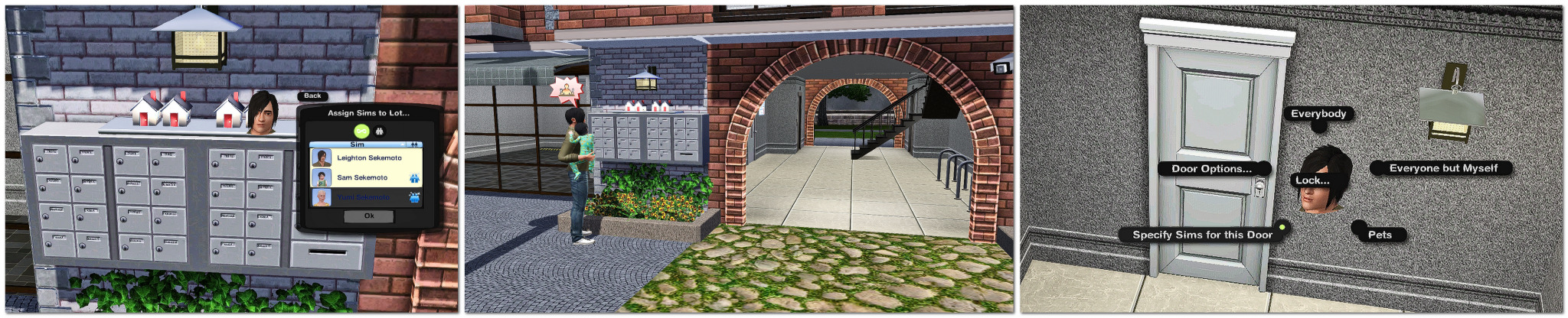
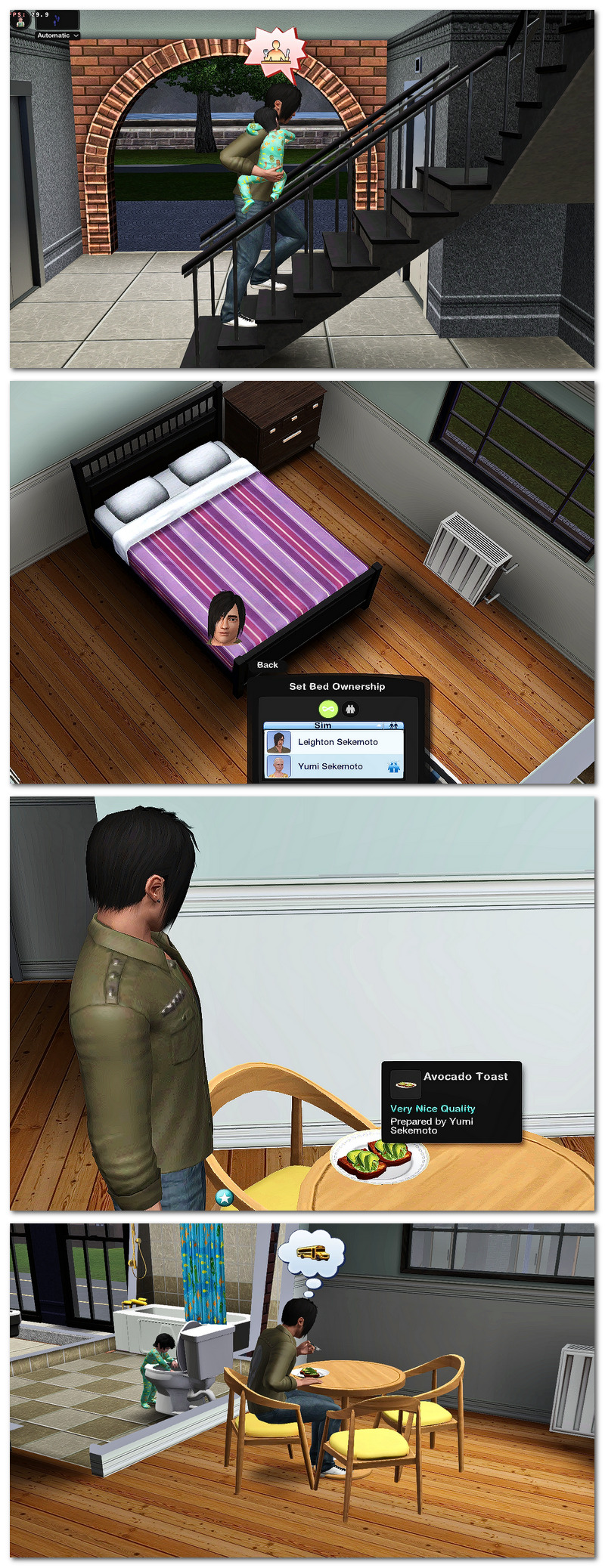
This is when you set the two most important things to make sure he'll go into the right flat; the door locks and the bed ownerships. The residents might not go inside the lot straightaway because sims love to idle but they will go in - and they have too many doors to choose from, so the the door locking system is very important! They will also go into their flats eventually if at least one of their motives is low - being tired will push them into their flats and into bed, being hungry will push them to their fridges and needing the toilet will push them to their bathrooms. Also make sure there is a cot/crib if they have a baby.
Make sure to use the door lock options to make sure he and his household use the doors to his flat only
Leighton went straight upstairs to his floor and put Sam down on the landing and went to get something to eat - an avocado toast in the fridge Yumi made earlier! - Sam followed him and played in the toilet LOL
I later switched to the Baker household and Becky Baker and her baby. She left her baby with her dad :)
I put her in the flat next door on the same landing as Leighton 😉
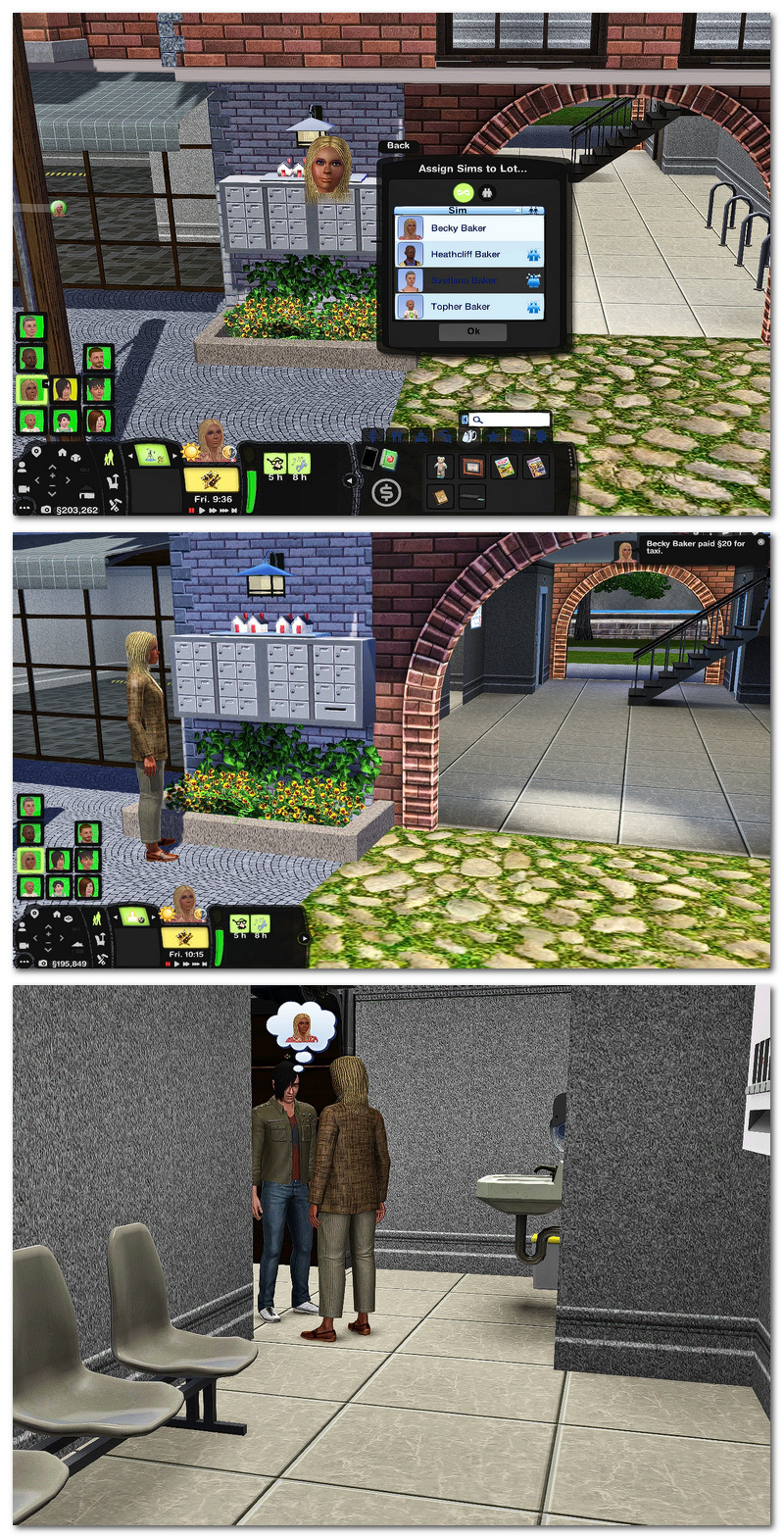
He was in the laundry room and she went straight to talk to him in there lol. Love it!
I haven't filled up the two partments upstairs yet, but I will in my main game. You assign the sims the same way to the markers outside, making sure you set the door locks and beds. If it really bothers you seing a bunch of inactive residents outside, or on the landings you can always add a common area for them to hangout in until they really need their motives sorted out.
Student Housing
I always like playing homeworld University. I never send sims to the Uni world. I have a home university and some small residential lots nearby for sims to live in while at college to simulate sims living on campus, away from home for a couple of weeks. With the Expanded Household mod I can do that without moving them out of their houses, especially teens! And again, the student residence doesn't have to be owned by anyone unless you want them to and it can be a residential or community lot.
I wanted to make sure teens could live away from home so I tested with River McIrish and some other teens from Sunset Valley.
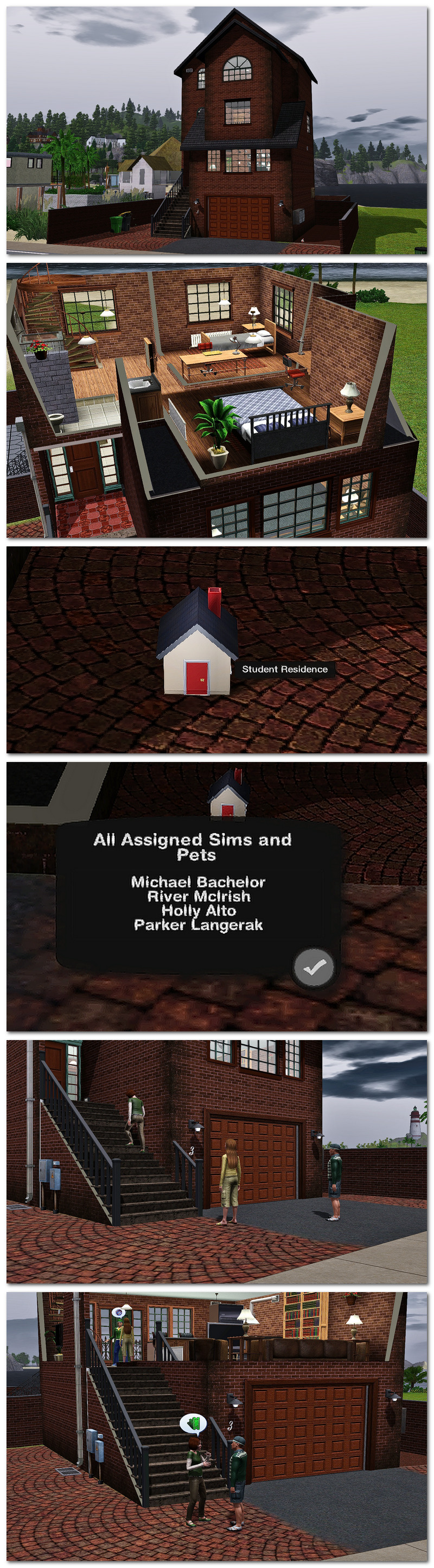
They all arrived! Look at them chatting up a storm in their new place! 😍
I've assigned their rooms, locked their doors and set their beds.✅
This will also work if their residence is on the same lot as the university.
Now, I had problems with the teens living away from home every night at 10.30pm! 😄
They weren't being pushed to go home as such, but the 'Go Home' interaction kept showing up in their queues, no matter how many times I'd cancel it.
I checked all the curfew settings in my NRaas settings. Even after disabling all the curfew and push settings in the town and castes options I set in NRaas Story Progression, I was still having problems keeping them where they were. I realised I completely missed the curfew setting under the 'Graduations and Proms' settings! LOL. I turned it off and that finally fixed things.
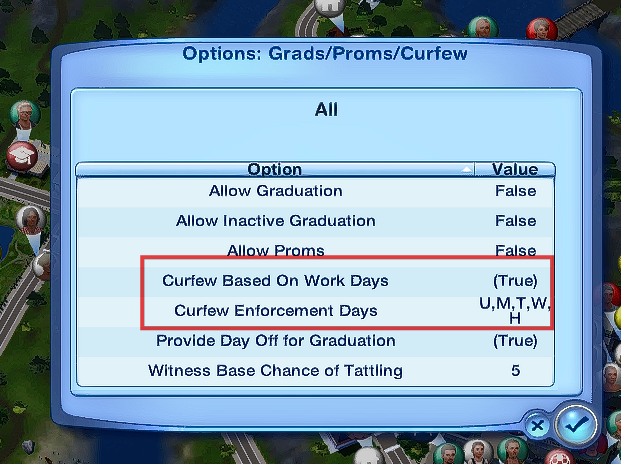
NRaas SP> Options>Grad>Proms>Curfews - this was the one setting that was very strict!
Expanded Apartments Notes
Remember, expanded sims/households on apartment lots will still have shared fridge inventories and shared household funds with their main household - BUT not with the expanded sims from other households that they may live with! You don't have to worry about the residents eating eachothers foods or use eachother's money! When Becky Baker gets food from her fridge, she won't be able to see the contents of Leighton and Yumi's fridge or eat their Avocado Toast. If Leighton uses his funds for a cab, it won't be from the Baker's funds. Brilliant! 😃
Each expanded sim/household gets their own mail from the mailbox, even if it's the same mailbox on an apartment lot.
Community Lots
When I was testing this, I added a marker to a community lot, not knowing for sure it would work and to my immense happiness, it did! This is where the mod really comes into it's own and is a massive game changer for me!
With this mod, Sims can live on community lots with a marker placed anywhere as it's open.
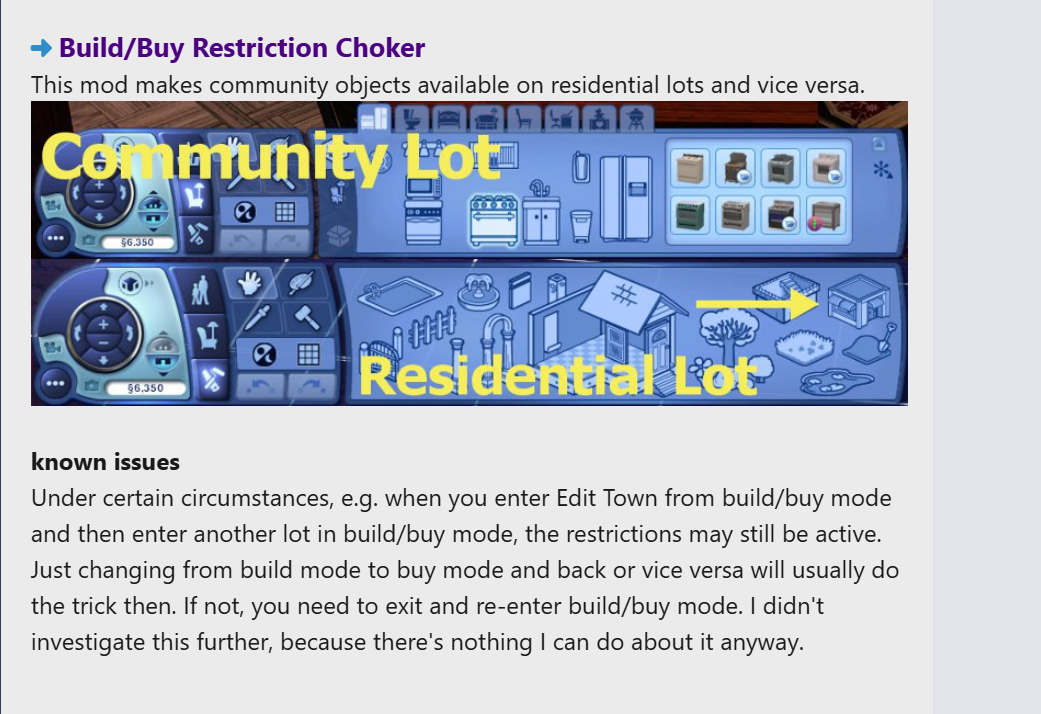
If you have Buzzler's Builder Stuff mod **** you can add residential items such as a cooker, fridge, bed - anything you'd consider a home comfort can be placed on a community lot for a sim to be confortable.
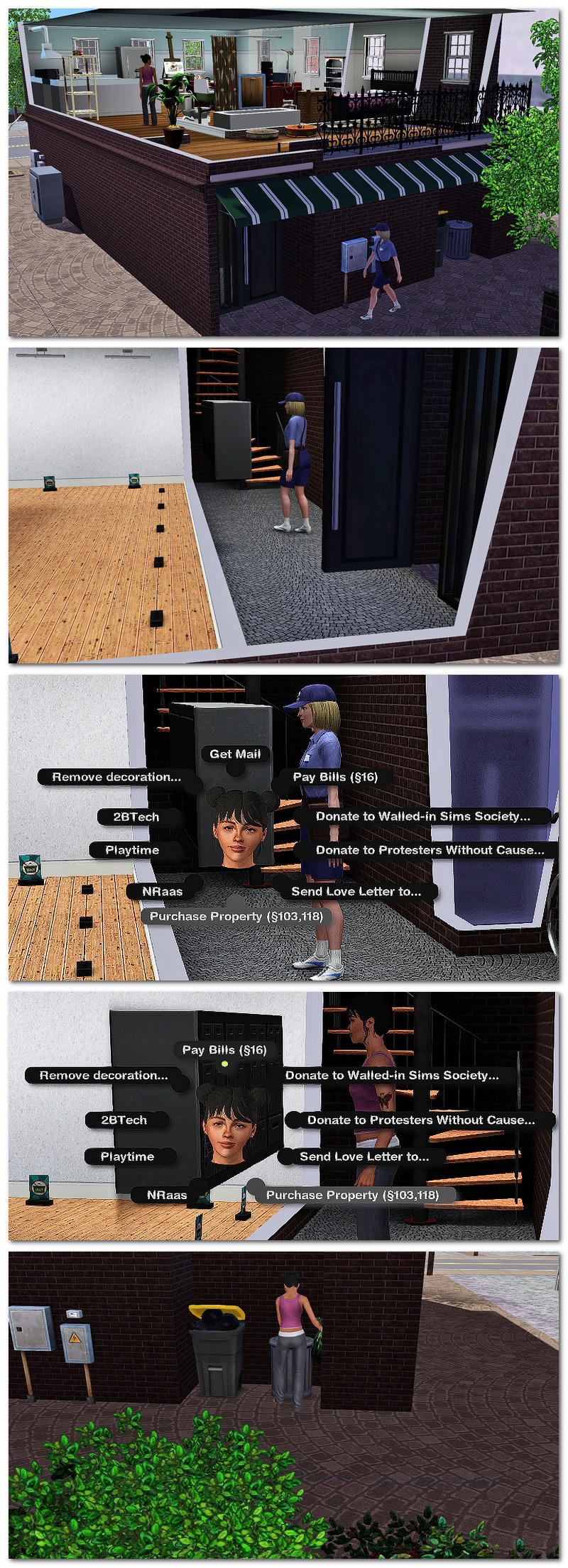
You can use my Community Lot Mailbox/Trashcan mod , which enables a mailbox and trashcan to be added to a community lot as if it was a residential lot and sims will get their mail, books etc as normal but there are some oddities. The bills aren't calculated properly as residential bills and they may not arrive autonomously. I can't do anything about that as the bills are hard-coded for residential lots, but if you add bills to the mailbox with NRaas Debug Enabler, the postman will arrive within 24 hours and post the sims bills.
If you have Pjsutton's Rental mod, the community 'home' will be considered a rental home and the sim may or may not pay rent, but I don't know how it's calculated as its not technically a house.
The bills might calculate if the community lot is owned by another sim.
Previously, I'd rely on NRaas MC>Settings>Allow Add Sim on Community Lots (True) and MC>Add Sim to make a sim 'live' on one, but with the Expanded house marker, you can assign a sim to live on one without the NRaas settings, but I use them both together to enjoy the best of both worlds!
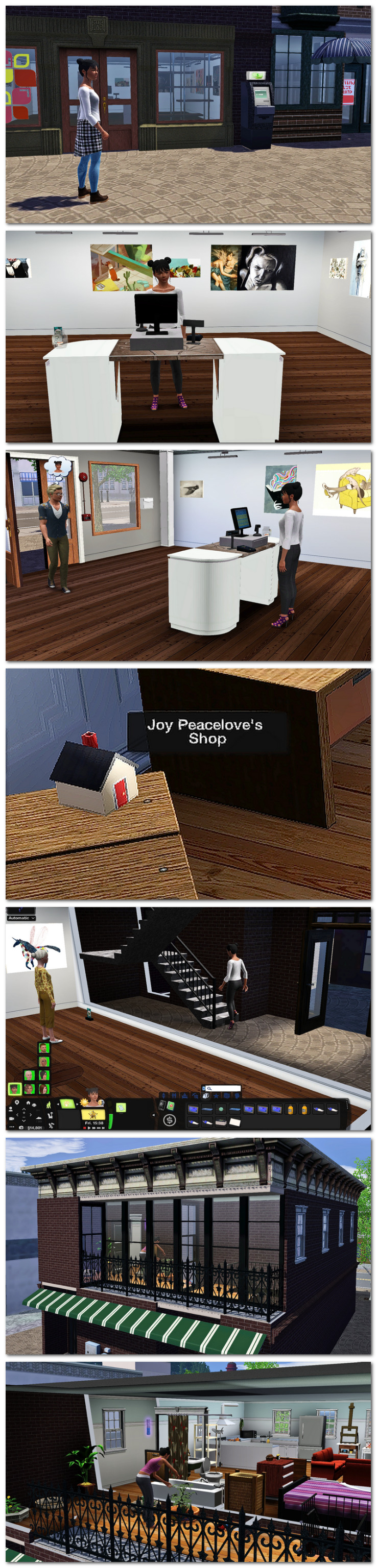
The main reason I like sims to live on a community lot is to have flats upstairs from shops. My artist sim Joy Peacelove, has a shop to sell her art. There is a small flat upstairs that I like her to live in as its bigger than her own tiny flat and there's more room for her to have an easel there do she can paint in her spare time.
I added a marker and assigned her to it so now she'll use the flat upstairs from the shop as her home as long as her name is on the marker.
Really though, I want the shop flat to be Joy's only home because she's meant to be a struggling artist. What struggling artist do you know that has two homes? Yeah, exactly! 😄
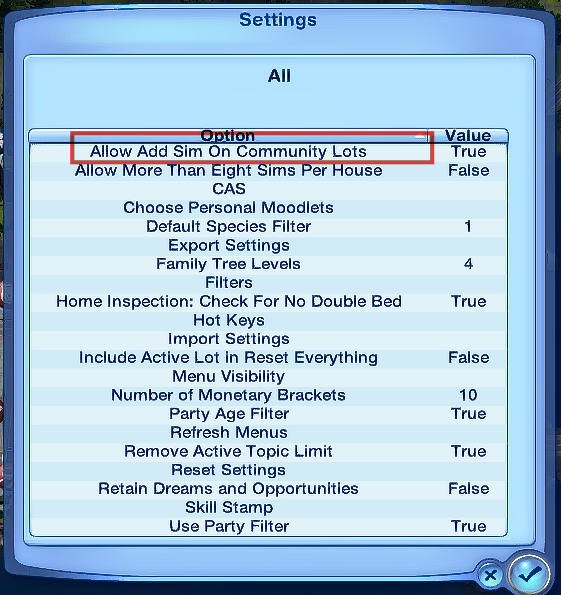
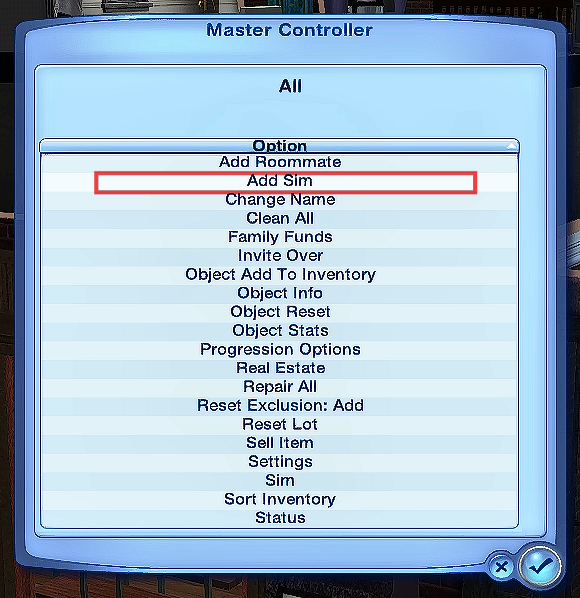
So I use NRaas Master Controller to add her to the lot and her main lot will be sold. (Make sure the setting 'Allow Add Sim On Community Lots> True' is set in MC: NRaas > MC > Settings > Allow Add Sim on Community Lots > True (is False by default).
As it is a community lot, there are still some quirks to living on one as their main home such as the sim won't always autonomously go home when sent to and sometimes certain home objects don't fully work such as the fridge - but using NRaas>Add Sim together with the Expanded Household not only makes the shop her home but all residential interactions will actually work properly!
To make sure her move goes smoothly, I first use my Open Family Inventory mod to move whatever furniture I want Joy to have from her main home to the shop flat. I make sure to empty the inventory before assigning Joy to the Expanded Household Marker or adding the sims to the lot otherwise I can't access it and she'll lose her contents (the Expanded mod overrides my mod and MC will delete the contents.)
I assign Joy to the marker. Now, to have her 'sell' her main house, I 'add' her to the community flat with MasterController.
I make a note of the Joy's household funds the sims household funds because she will get the money from the 'sale' of her main house and I want to deduct it.
When adding a sim to a community lot, you must switch to another sim/household first as the sim will 'disappear' if she's the active sim while being added.
I switch to another sim, click on the exterior of the art shop, NRaas>MC>Add Sim and search for Joy in the filter and added her to it, then switch back to her when done.
If successful, when you switch back to your expanded sim, you'll see she has the full amount of money from her main house in her household funds, even if she was renting it. You can take that money off by clicking on the sim: NRaas>MC>Household> Family Funds. Enter the minus sign and the amount to subtract. Her main and only home is now the the shop! Like the apartment, make sure you lock the doors of the flat to everyone but the sim, set her bed and make sure all other doors she's not using is locked to her.
When you add a sim to a community lot, the mailbox might disappear but you can just one back again.
Now Joy's only place of residency is the small flat upstairs from her art shop!
MC makes the flat her only livable place, and the Expanded mod makes everything in that place work as if she was in a proper house!
Makeshift Daycare Service/Childminders
If you have a childminder sims and don't want to use the default daycare career for them, you can always set up your own makeshift daycare service! Run it on a residential or community lot, have a sim live or own the lot, and have childminders live or work there.
Switch to the families who have toddlers/children and assign them to the childminder's lot, even if its just for the day. Take them off when you're ready for them to leave and they'll teleport home!
A daycare service is defintely needed in this town as the babysitters are...nowhere to be found lol
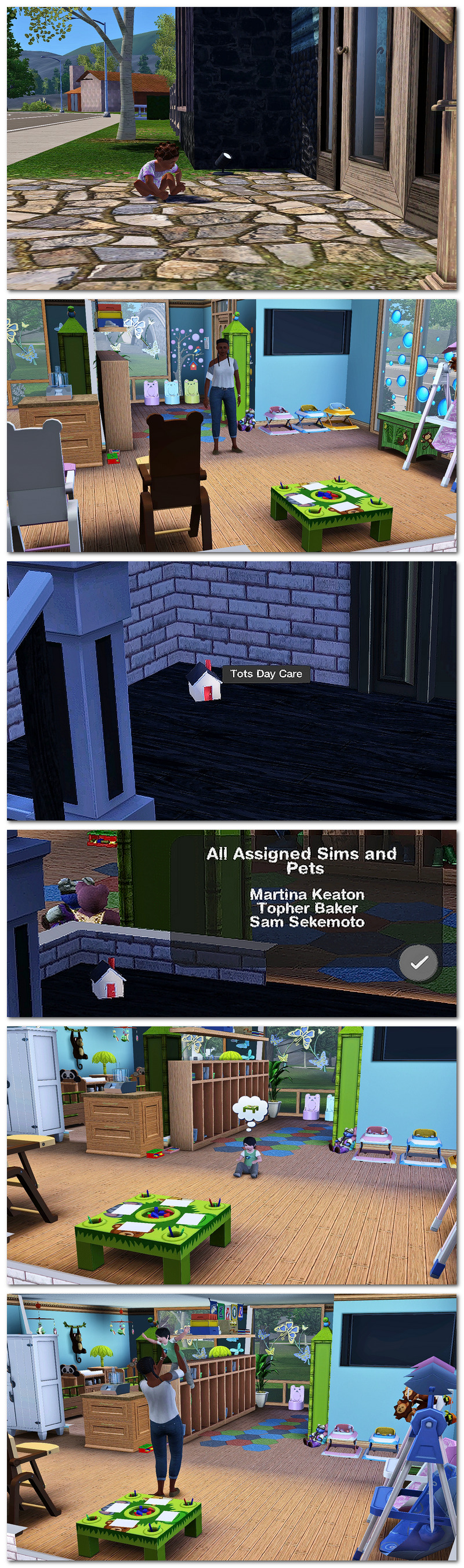
Darla at her home daycare, a cute building by PolarBearSims at MTS! 😍
I didn't direct any of the toddlers to 'go home' to the daycare because I wanted to see if any turned up autonomously. One teleported to the daycare in about two minutes! 🥳
Other Community Lot ideas
Use the household marker at community lots for temporary stays such as:
- Hospital stays - if you have an open hospital, add a marker there and assign selected sims to stay at a hospital when they get sick for a few days! Assign their beds. You can lock their doors if you don't want them to go out or wander around but make sure they can have something to eat when they want.
- Jail/Prison stints - add a marker at an open police station/jail. Assign prisoners to the marker. Assign their beds and lock the main doors so the prisoners are free to wander around the prison lot and yard but not leave the building until they do their time!
- Bootcamp/military training camp - delinquent sims and soldier sims can be assigned to a marker at an open basecamp.
- Care Home for the elderly - elderly sims assigned to a marker at a care home. If you don't want your elderly sims to live at a care home permanately, this is a nice alternative!
- Hotel/motel/inn/lodge/camping - Short stays for sims who want a holiday break from home!
Expanded Community Lot Notes
You can add Twin's utilities from her mod to the community lot as an expanded sim and the sim will be billed for their power, water and AC usage on the lot. The bill amount is quite low, but that's not necessarily a bad thing. 😄
Pets
I don't play with pets that much except horses, but I really like that we can assign pets to the markers if we want! When PJSutton (the creator of the Rental mod at MTS) made the Horse Boarding Service mod,
I had the privilege of helping to test it out and learned to love playing with horses in my game! 🐎 With the mod, your sim can buy or adopt a horse and board it elsewhere if they live in a small house or apartment with no stable. You had to add another mod to stop the horses being pushed home though, but it didn't always work properly, and the horse would find itself being pushed home and suffer low motives and routing problems because it had no where to run, sleep or eat at it's own home. With Savanita's Expanded mod, this is no longer a problem!
Add some stables to a residential or community lot, making sure they have a roof over them, some water, hay, salt lick, apples, carrots, etc, whatever else a horse needs.
Have a sim own it or manage it. Switch to the family you want to buy/adopt a horse for.
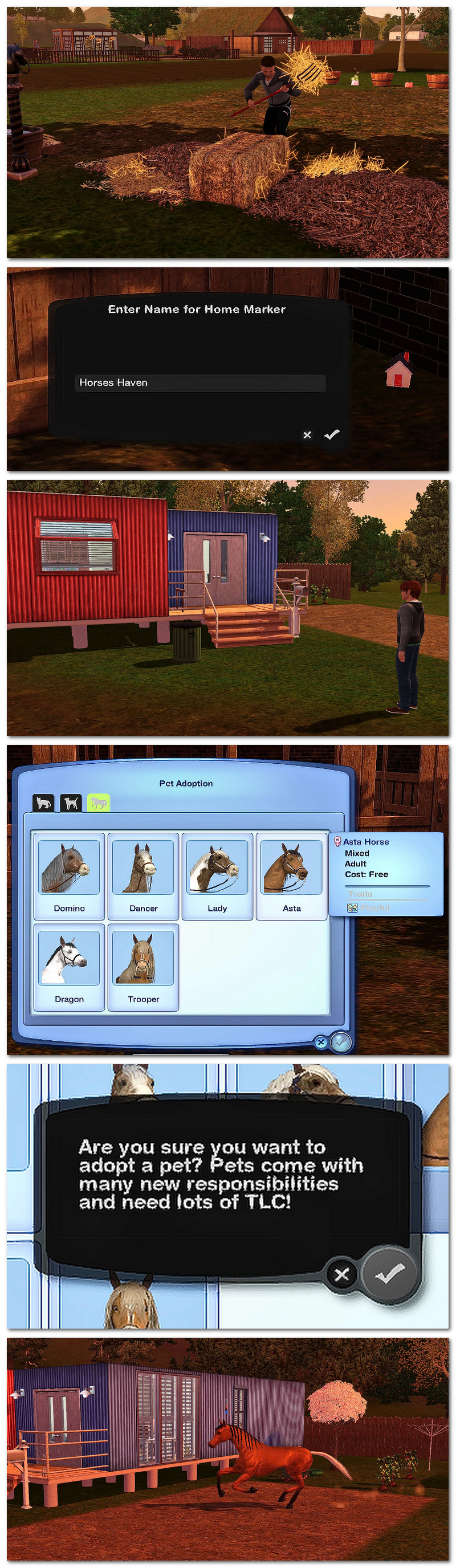
Christopher Steel lives in a small trailer but he wants a horse so he adopts Asta, who he can board at the Horses Haven stables owned by the local farmer, Davon Selby. 🐎

As the horse's owner, assign the horse to the marker at the stables (Assign Pets to Lot…)
As the horse, click 'Go Home' on their portrait. The horse should hopefully run to the stables! (Christopher was already riding Asta, so they rode to the stables!)
Click on one of the stables>Boarding Services>Boarding Roster>Request Boarding Approval. Wait for approval.
The expanded marker will stop the horse from trying to run back home every morning as the stables is now the horse's home!
If the stables aren't owned by a sim, you can still assign your horses to the stables without using the boarding mod - the horse won't leave.
Set up your own boarding service and have owners pay with the banking mod. You can assign sims to live at the stables too who can work as stable hands to take care of the horses for owners.
This could work for other pets too! If you have a vet service, sims can temporarily house their sick pet at the vets with nurses to take care of them until they're well enough to go home!
Other mods that compliment Savanita's Expanded Household mod:
Needed: Lazy Duchess' MonoPatcher - without it, the mod won't work!
Desiree101 Open Family Inventory mod
Desiree 101 Community Mailbox/Trashcan mod
PhoebeJaySims Club mod - with banking
PhoebeJaySims Taxes and Benefits mod
PJSutton Apartments & Roommates Fix (Rental) mod