

TummyZa Non-Default Skin Conversion
by truebass
Uploaded July 31, 2026, 9:55 p.m.
Updated Aug. 25, 2026, 7:15 a.m.
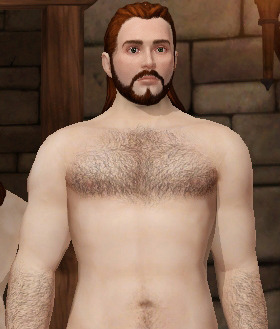
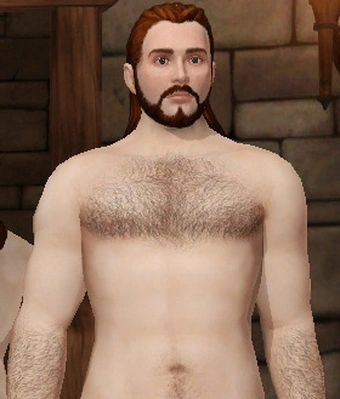
This is a default to non-default conversion of the skins created by TummyZa originally uploaded on Mod the Sims (here and here). Back in 2011 when they made them, it wasn't yet known how to make a non-default skin, so now I decided to take the liberty of converting them, since I wanted more options in CAS.
These skins have realistic details, such as different coloration across the body rather than a flat color, body hair and are "anatomically accurate". They come in all of the 10 EA colors and are male only. However, since skintones aren't differenciated by gender in this game, I had to use the EA textures on female sims, so that they display correctly on them.
There's 2 versions: a non-hairy and a hairy one. Their only difference is the amount of body hair. You may install both versions or only one of them and you can even use one of the original default replacements with these ones. Please note that I used the same thumbnails as the corresponding EA skinstones, which unfortnately means you'll see three identical looking colors on the skin panel.
UPDATE: I have uploaded a new version of the skins where the non-hairy skintones have a blue thumbnail and the hairy have a green thumbnail. This makes them much easier to ditringuish, however you can only know the actual color of the skin once you pick it.
If you'd only like to install some of the skintones, I'm providing separate package files for each skintone in either version but merged files are also included (non-hairy, hairy or both).
A useful mod to use with this would be spicybarbeque's ScrollBarForSkintonePanel, which adds a scrollbar to the skin tone panel for convenience.
Attributions
- TummyZa for the original skintones
- TSM Custom Skin Creator by Mrs4ewup; it made creating custom skins so much easier.
- Spicybarbeque's tutorial on how to make a custom TSM skin; it gave me the idea to make this conversion.
Other Uploads By truebass:
TSM Font Replacements + Templates
by truebass
4 font replacements for the Sims Medieval, plus templates to make your own replacement.