Sims 3 Easy Extractor & Merger Tools
by phantom99
Uploaded Jan. 21, 2026, 12:17 p.m.
Updated Sept. 16, 2026, 10:57 a.m.
Updated 2026/08/11
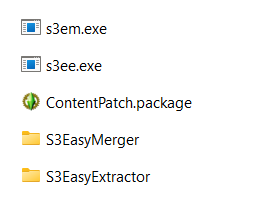
This download contains two small drag-and-drop tools (no GUI whatsoever) that allow you to easily extract and merge Sims 3 content.
These tools are made using code from:
- Sims 3 Mod Organizer by g0kur (source code)
- s3pi library by Peter L Jones
- TS3 Recompressor by J. M. Pescado (source code)
Requirements:
- Windows: .NET Framework 4, which you likely already have
- macOS: Mono
1. Sims 3 Easy Extractor (s3ee)
This tool extracts the contents of .Sims3Pack files and also extracts thumbnails from packages.
Features:
- Automatically renames extracted packages even if the .Sims3Pack file contains multiple files.
- Extracts a thumbnail of each extracted package.
- Automatically converts extracted DBPP packages to DBPF format, so you no longer need to process your Store content through Recompressor (s3rc).
- Extracts all CC from the extracted .sim file into a separate .package file so you can easily delete it if you don't need it.
- Extracts all strings from the extracted .world file into a separate .package file, as the game does not see strings merged with worlds.
- Automatically patches official Store content with the official patch (ContentPatch.package), provided that it is present in the tool's directory during the extraction process.
- Automatically fixes patterns exported from the CAP tool.
- Can extract game-generated thumbnails.
How to extract .Sims3Pack files:
Note: If you want to extract Store content, ensure ContentPatch.package is present in the tool's directory.
Windows:
- Select your .Sims3Pack files, or select a folder (or multiple folders) containing them.
- Drag and drop the selected items onto s3ee.exe (you can drag them from another Explorer window).
- A command prompt window should appear where you can monitor the extraction process.
- The extracted files will be placed in the S3EasyExtractor folder in the tool's directory.
macOS (with Mono installed):
- Right-click on a folder where s3ee.exe is located, select "New Terminal at Folder" (might be under "Services").
- In the opened Terminal window, type
mono s3ee.exefollowed by a space. Do not hit Return/Enter just yet. - Back in Finder, select your .Sims3Pack files, or select a folder (or multiple folders) containing them.
- Drag and drop the selected items onto the Terminal window.
- With the Terminal window active, hit Return/Enter.
- The extracted files will be placed in the S3EasyExtractor folder in the tool's directory.
Where to install extracted files:
- Lots and households (lot_*.package and household_*.package files) → Documents\Electronic Arts\The Sims 3\Library
- Other .package files → Install like regular mods or merge via s3em and then install
- Sims (.sim files) → Documents\Electronic Arts\The Sims 3\SavedSims
- Worlds (.world files) → GameData\Shared\NonPackaged\Worlds in the game's install location
How to extract thumbnails from packages:
Windows:
- Select the packages you want to extract thumbnails from, or select a folder (or multiple folders) containing them.
- Drag and drop the selected items onto s3ee.exe.
- A command prompt window should appear where you can monitor the extraction process.
- The extracted thumbnails will be placed next to the files they were extracted from.
macOS (with Mono installed):
- Right-click on a folder where s3ee.exe is located, select "New Terminal at Folder" (might be under "Services").
- In the opened Terminal window, type
mono s3ee.exefollowed by a space. Do not hit Return/Enter just yet. - Back in Finder, select the packages you want to extract thumbnails from, or select a folder (or multiple folders) containing them.
- Drag and drop the selected items onto the Terminal window.
- With the Terminal window active, hit Return/Enter.
- The extracted thumbnails will be placed next to the files they were extracted from.
2. Sims 3 Easy Merger (s3em)
This tool merges packages as well as .Sims3Pack, .dbc and .ebc files using the merging method from g0kur's Sims 3 Mod Organizer.
Features:
- Automatically skips files that should not be merged (lots, sims, worlds, etc.).
- Automatically converts DBPP packages to DBPF format during the merge process.
- Automatically patches official Store content with the official patch (ContentPatch.package), provided that it is present in the tool's directory during the merge process.
- Automatically fixes patterns in .Sims3Pack files exported from the CAP tool.
How to merge files:
Note: If you want to merge encrypted Store .Sims3Pack, .ebc or .package files, ensure ContentPatch.package is present in the tool's directory.
Windows:
- Select a folder (or multiple folders) containing the .package, .Sims3Pack, .dbc or .ebc files you want to merge. Any subfolders will also be scanned for such files.
- Drag and drop the selected folder(s) onto s3em.exe (you can drag them from another Explorer window).
- A command prompt window should appear where you can monitor the merge process.
- The merged files will be placed in the S3EasyMerger folder in the tool's directory.
macOS (with Mono installed):
- Right-click on a folder where s3em.exe is located, select "New Terminal at Folder" (might be under "Services").
- In the opened Terminal window, type
mono s3em.exefollowed by a space. Do not hit Return/Enter just yet. - Back in Finder, select a folder (or multiple folders) containing the .package, .Sims3Pack, .dbc or .ebc files you want to merge. Any subfolders will also be scanned for such files.
- Drag and drop the selected items onto the Terminal window.
- With the Terminal window active, hit Return/Enter.
- The merged files will be placed in the S3EasyMerger folder in the tool's directory.
Notes:
- This tool merges the contents of each dragged folder separately. If you want to merge all your folders into the same merged package, put them all in a single folder and drag that folder instead.
- The size limit for merged packages is approximately 2 GB. They will split into different packages whenever the size limit is met.
- Files and subfolders that come first alphabetically overwrite those that come after. This is a useful trick to set priorities for your files and subfolders.
Tip:
I recommend placing s3em.exe in your Mods folder (not in Packages or Overrides) and adding the lines below to your Resource.cfg file. This way, you won't have to move the merged files to your Mods folder manually each time. If you additionally use CCMagic or S3MO, you will also need to add these lines to their settings.
Priority 495
PackedFile S3EasyMerger/*.package
Changelog:
- 2026/02/05: Downgraded the projects from .NET 6 to .NET Framework 4.
- 2026/05/09:
- Patterns in .Sims3Pack files exported from the CAP tool will now be automatically fixed when extracted/merged.
- Merging .Sims3Pack files is now as fast as merging packages.
- You no longer need to manually delete old merged builds in the S3EasyMerger folder - they will now be automatically overwritten.
- Individual Sim thumbnails will no longer be extracted from save files and worlds.
- 2026/05/30: Added detection of Sims 2 and Sims 4 packages.
- 2026/06/14:
- Adult and elder versions of Store hairstyles will now be automatically merged when extracted, as they use the same resources.
- Fixed a minor error that occurred when merging Store .Sims3Pack files containing patterns.
- 2026/08/11: S3EE can now extract game-generated thumbnails, which is useful for CC items that don't have proper thumbnails.
Tools used: