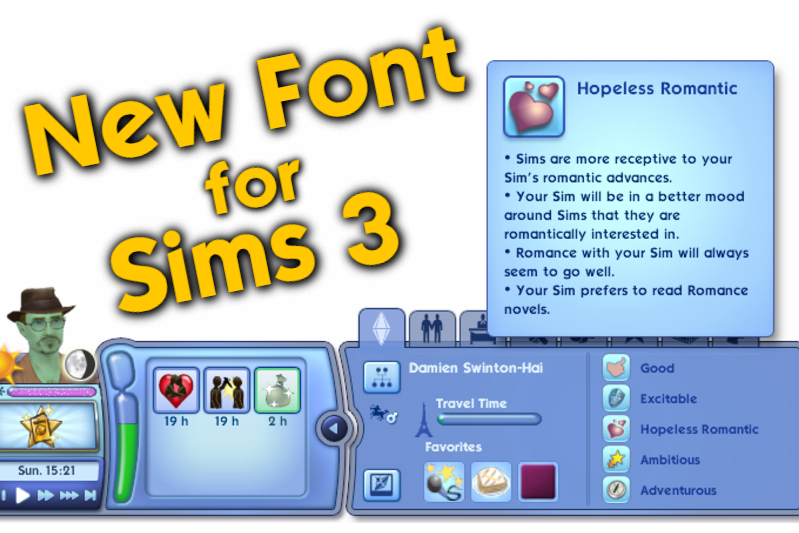


Font Replacement (The Sims Sans)

by OhRudi
Uploaded July 20, 2025, 4:46 p.m.
Updated Feb. 6, 2026, 5:14 p.m.
TL;DR
- overrides the font used in game with the font "The Sims Sans"
- Compatible: with every UI mod I could find, I tested it
- Installation: just put the file in your packages-folder
- Conflicts: Font Replacement by simstateTS3, poppins font override by shellseasims and font replacements by lwillowlthewicked
- Patch: v1.67/v1.69
Installation - just put the file in your packages-folder, the usual way, nothing special required.
How create a font replacement of your own
- Find your font somewhere online
- Download your font as a ".ttf" file
- Download my mod
- Open my mod with S3PE
- Right click on the "HelveticaNeueLTStd-Md" entry > Replace > choose your font in .tff format
- Right click on the "TextStyles" entry > notepad > a new window with CSS Code opens (this really easy to read, believe me)
- CTRL + H (to replace text within the file) > replace all occurences of The Sims Sans with the name of your font (do not remove anything else, only replace the name with your font name)
- Check if all got replaced right. Each quote symbol has to be present, just like before. Then Save the file and close the text editor.
- Save the package file in S3PE. You're done.
- Test the result in game.
Replace Non-Latin Fonts (like Greek or Russian)
- find the font you want to replace it with and download it in ".tff" format
- download the file "non_latin_font_replacement_template", it's in the downloads tab
- open it with S3PE
- right click at the entry with the name "TrebuchetEAbold" > Replace... > choose your font in ".ttf" format > submit
- right click at the entry with the name "TextStylesWestern" > Notepad > (a new Window with Text opens) > Edit > Replace > enter the first text box: Trebuchet EA (it's the name of the original font) > enter in the second text box the name of your new font > Replace All > Save the file and close the text window
- save your package in S3PE and close it
- place the package file in your mods folder. Start the game. Does the new font show up in your language?
- You're done. You made a new font replacement.
- Now share it with the world, upload it to ModTheSims, Simblr or Tumblr and link this tutorial and share the love for this awesome game
Replace Chinese Font
- find the font you want to replace it with and download it in ".tff" format
- download the file "chinese_font_replacement_template", it's in the downloads tab
- open it with S3PE
- there are two Chinese character sets available: Chinese Traditional and Chinese Simplified, you can replace both or just one, you decide
5. if you replace Chinese Traditional: 1. right click at the entry with the name "bhei01m" > Replace... > choose your font in ".ttf" format > submit 2. right click at the entry with the name "TextStylesTChinese" > Notepad > (a new Window with Text opens) > Edit > Replace > enter the first text box: AR Heiti Medium B5 (it's the name of the original font) > enter in the second text box the name of your new font > Replace All > Save the file and close the text window
6. if you replace Chinese Simplified: 1. right click at the entry with the name "ggtr00b" > Replace... > choose your font in ".ttf" format > submit 2. right click at the entry with the name "TextStylesSChinese" > Notepad > (a new Window with Text opens) > Edit > Replace > enter the first text box: AR YuanGB Bold (it's the name of the original font) > enter in the second text box the name of your new font > Replace All > Save the file and close the text window
- save your package in S3PE and close it
- place the package file in your mods folder. Start the game. Does the new font show up in your language?
- You're done. You made a new font replacement.
- Now share it with the world, upload it to ModTheSims, Simblr or Tumblr and link this tutorial and share the love for this awesome game
Replace Japanese Font
- find the font you want to replace it with and download it in ".tff" format
- download the file "japanese_font_replacement_template", it's in the downloads tab
- open it with S3PE
- right click at the entry with the name "DF-KaKouGothic-W5" > Replace... > choose your font in ".ttf" format > submit
- right click at the entry with the name "TextStylesJapanese" > Notepad > (a new Window with Text opens) > Edit > Replace > enter the first text box: DFGothicP-W5 (it's the name of the original font) > enter in the second text box the name of your new font > Replace All > Save the file and close the text window
- save your package in S3PE and close it
- place the package file in your mods folder. Start the game. Does the new font show up in your language?
- You're done. You made a new font replacement.
- Now share it with the world, upload it to ModTheSims, Simblr or Tumblr and link this tutorial and share the love for this awesome game
Replace Korean Font
- find the font you want to replace it with and download it in ".tff" format
- download the file "korean_font_replacement_template", it's in the downloads tab
- open it with S3PE
- right click at the entry with the name "AsiaSDNREA" > Replace... > choose your font in ".ttf" format > submit
- right click at the entry with the name "TextStylesKorean" > Notepad > (a new Window with Text opens) > Edit > Replace > enter the first text box: AsiaSDNR EA (it's the name of the original font) > enter in the second text box the name of your new font > Replace All > Save the file and close the text window
- save your package in S3PE and close it
- place the package file in your mods folder. Start the game. Does the new font show up in your language?
- You're done. You made a new font replacement.
- Now share it with the world, upload it to ModTheSims, Simblr or Tumblr and link this tutorial and share the love for this awesome game
Replace Thai Font
- find the font you want to replace it with and download it in ".tff" format
- download the file "thai_font_replacement_template", it's in the downloads tab
- open it with S3PE
- right click at the entry with the name "PSK SarabunSim3" > Replace... > choose your font in ".ttf" format > submit
- right click at the entry with the name "TextStylesThai" > Notepad > (a new Window with Text opens) > Edit > Replace > enter the first text box: PSK SarabunL (it's the name of the original font) > enter in the second text box the name of your new font > Replace All > Save the file and close the text window
- save your package in S3PE and close it
- place the package file in your mods folder. Start the game. Does the new font show up in your language?
- You're done. You made a new font replacement.
- Now share it with the world, upload it to ModTheSims, Simblr or Tumblr and link this tutorial and share the love for this awesome game
Technical Details
- this mod edits two resources in the UI.package, located in the installation directory of sims
- any other mod that overrides fonts conflicts with this mod
- Conflicts: Font Replacement by simstateTS3, poppins font override by shellseasims and font replacements by lwillowlthewicked
Additional Credits: The Sims Sans Font Download @cowplantcartel on tumblr, for inspiring me to do this mod @shellseaisms on tumblr, for giving me a perfect mod template S3PE @you-will-never-find-me-anymore for letting me use her Bonehilda for my awesome profile picture
Other Uploads By OhRudi:

Potions (Chemistry Lab) fit everywhere
Project: Less Space Needed
 by
OhRudi
by
OhRudi
Chemistry Lab Potions can be placed on every surface

Fix: Nektar Squishing Makes You Dirty
by
OhRudi
Fix: Nektar Squishing Makes You Dirty
Fix: Sims need less Space
Project: Less Space Needed
by
OhRudi
all interactions take up less space, improves routing, especially in tight spaces
Non Walkable Fences Basegame
by
OhRudi
Base Game fences, but not sims won't walk over them

Rabbit Holes without Sound
by
OhRudi
Mute those damn rabbit holes

Create A World Tool, for Patch 1.67 and 1.69, Version 1.19.6
by
OhRudi
This is just a backup, in case the official download link is offline
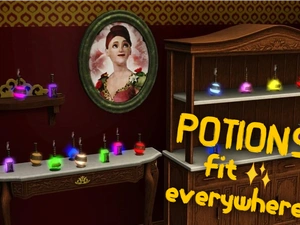
Potions (Alchemy) fit everywhere
Project: Less Space Needed
by
OhRudi
Alchemy Potions can be placed on every surface
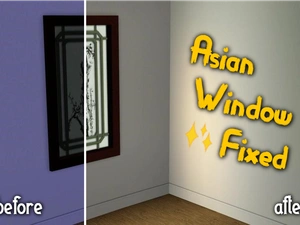
Fix: Asian Window emits light
by
OhRudi
The "King Qing’s Window" now emits light